
FitPilot AI | Job Scan Organizer + AI Assist

MY ROLE: Product Designer & Developer
TOOLS: Figma AI, Claude Cowork & Code, GitHub
DURATION: 20+ hours
PLATFORM: Desktop only
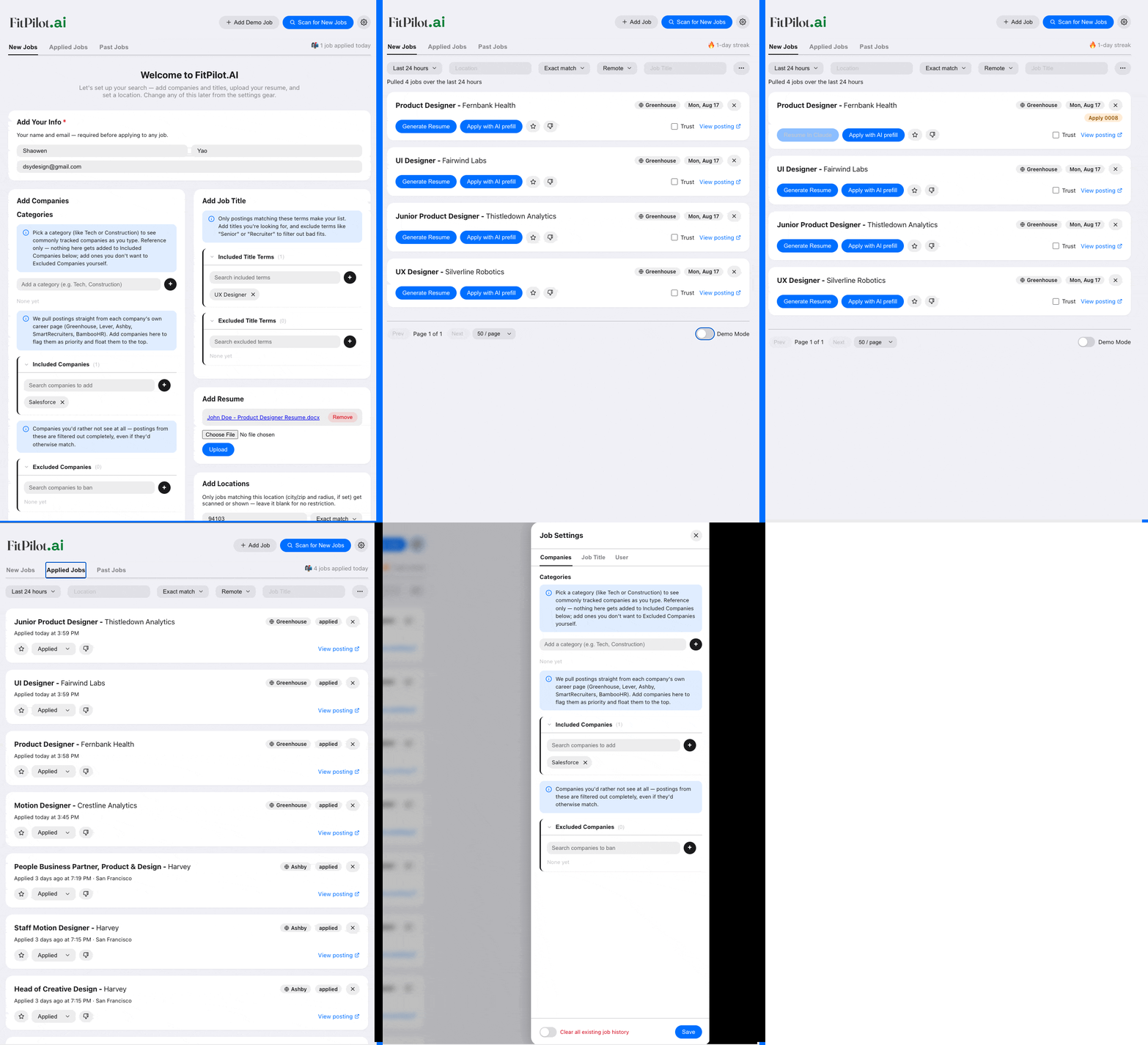
Job Apps CRM AI Dashboard with AI Assist
You can find the Github Repo link here and a wireframe HTML only demo link here.
Problem
Job seekers face rising stress — AI layoffs, ghost jobs, endless reapplying, and tracking it all by hand. Recruiters, meanwhile, screen candidates with enterprise-grade AI Dashboard tools.
Solution
FitPilot levels that playing field: it scans postings, organizes them by status, tailors resumes and cover letters with AI, and flags likely ghost jobs — you still review and apply manually. It’s a free, open-source, end-to-end job application dashboard.
Please note due to the complex functionality of this product, I chose it for to be desktop only at the moment.
Product
This is an animated gif. Please check your phone or browser settings for common fixes.
Role
Job applications had become repetitive and exhausting, so I researched & designed & developed a tool that scans, organizes, tailors, and flags shady listings — using AI for both the UX research and the build. I designed it like an ATS dashboard flipped for job seekers, guided Claude Code to develop it as a former developer, and open-sourced it on GitHub for others facing the same grind.
What Others Do Well
Our team did product research on direct and tangential competitors. We looked at Jobsight, Careerflow AI, and Applykit.
 We used Claude CoWork to analyze market product needs met from competitors.
Jobsight
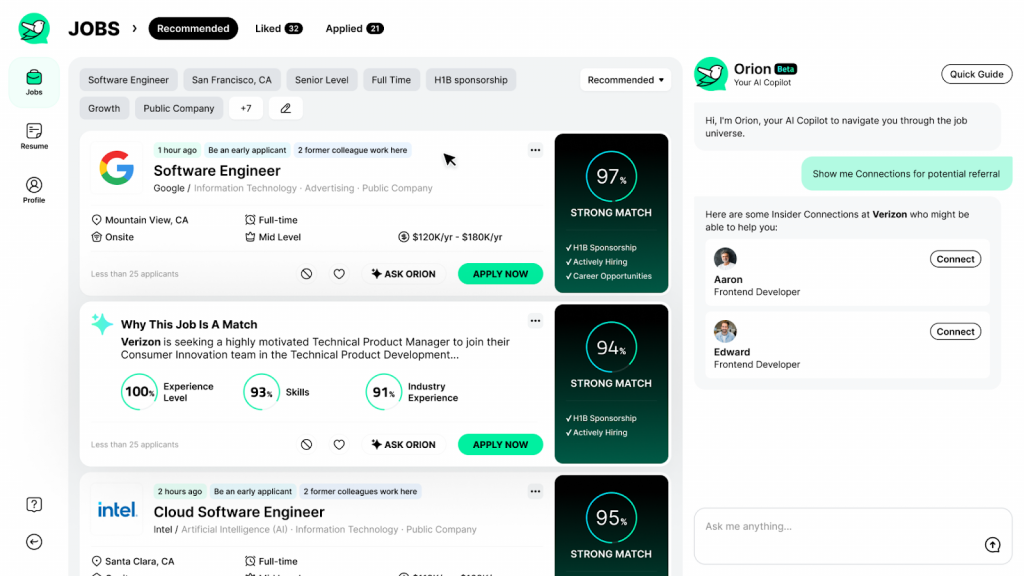
- AI copilot actively finds and scores relevant postings — no manual searching needed.
- 1-click autofill extension makes applying nearly instant once a job is chosen.
- Runs on a proprietary cloud model, so nothing stays local.
- No way to check whether a posting or company is actually legitimate.
Careerflow AI
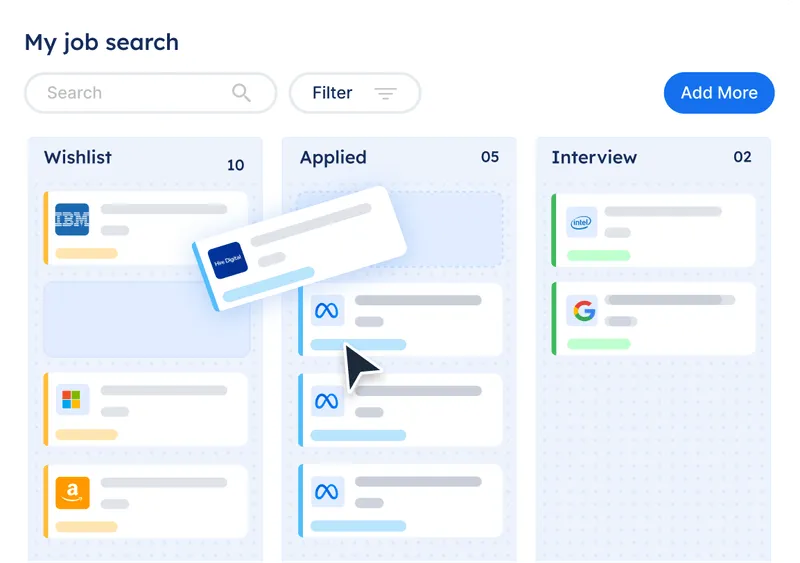
- Focuses on resume scoring and improvement suggestions rather than automating anything.
- Never submits or tailors on the user’s behalf — lowest-risk of the three.
- Doesn’t scan for jobs or tailor materials per posting.
- Best suited as a companion tool, not a full application workflow.
Applykit
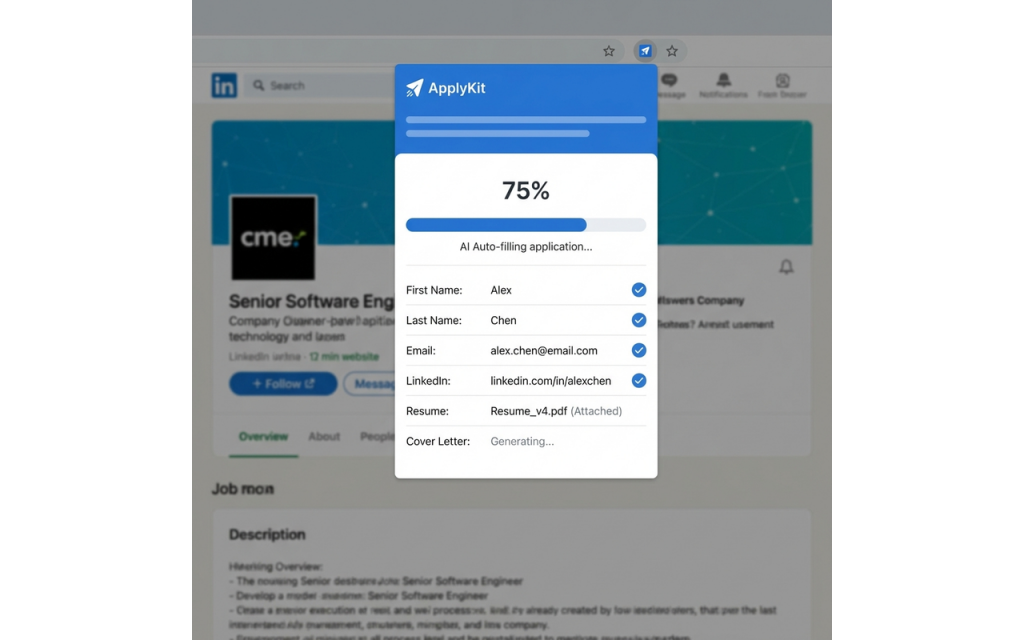
- Tailors resumes with a local LLM (Ollama), so nothing leaves the user’s machine.
- Fully open-source and free — closest philosophy match to this project.
- Doesn’t scan for postings or check legitimacy.
- Autofill and final-submit behavior aren’t clearly documented.
Survey & Research
We used Claude CoWork to analyze user research for affinity map and other findings.
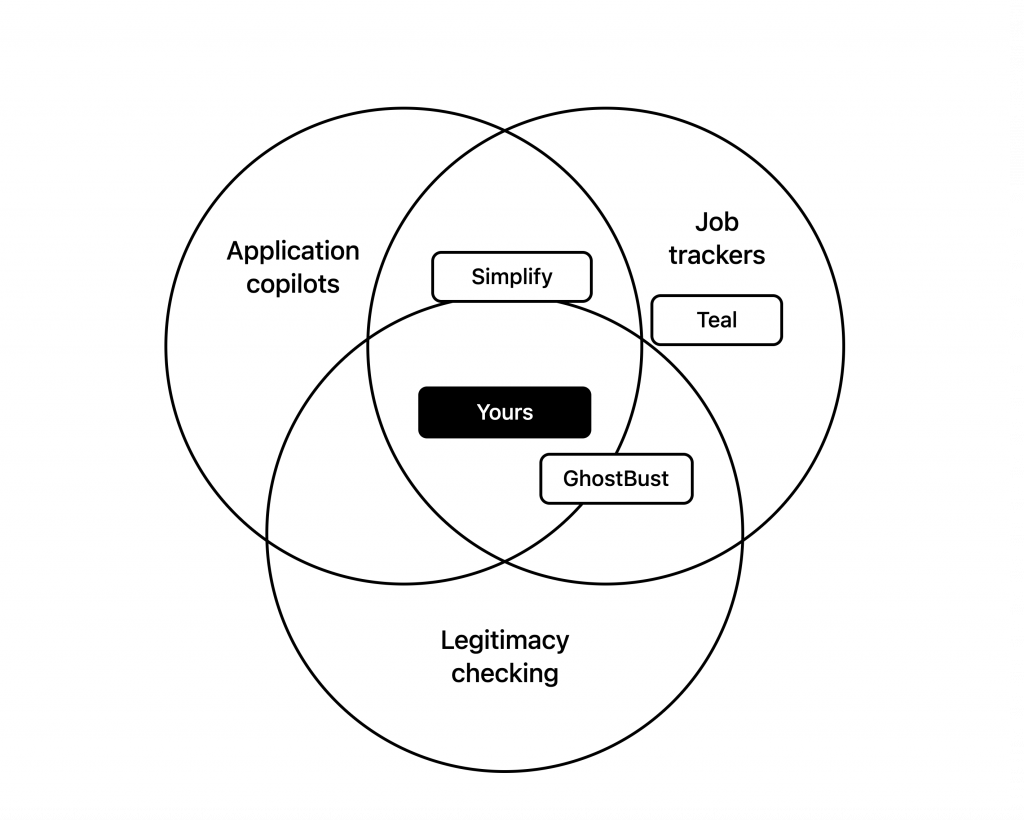
Based on user needs, we did more research on aspects of the job application process the users wanted. We found various products filled some needs, but not others.
| GhostBust | Teal | Simplify | |
| Find Jobs | ❌ | ❌ | ✅ |
| Job Application Tracker | ❌ | ✅ | ❌ * |
| Resume Tailoring | ❌ | ❌ | ✅ |
| Job Apply Autofill | ❌ | ❌ | ✅ |
| Ghost Job Verification | ✅ | ❌ | ❌ |
| Company Verification | ❌ | ❌ | ❌ |
Survey
We put together a quick Google survey asking what frustrations users had (50 users). These was the most relevant user questions from the data.

Affinity Map
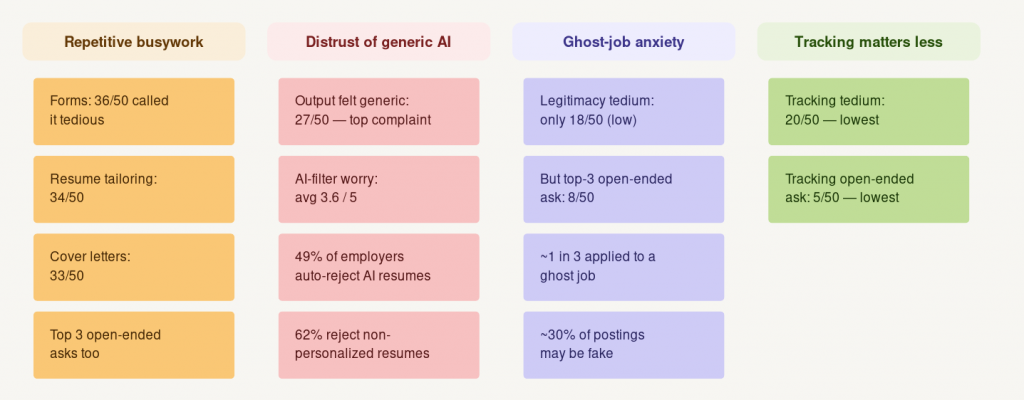
Repetitive busywork, generic AI output, and ghost jobs topped the pain list — so the app find jobs for user via scans across job sites, keeps AI tools in check with manual review, and flags likely fake postings.
Ideation
 As a user, I want a tool that finds real job postings and tailors my resume for them.
Product Values
I. Jobs matched to user needs with custom user flagging
II. AI tailored resumes with full manual approval for user actions
III. Job Application Tracker & Organizer with user customization
Wireframe Brainstorming
I looked at many dashboards, using salesforce as a UI example. I then looked at recruiter dashboards as inspiration.
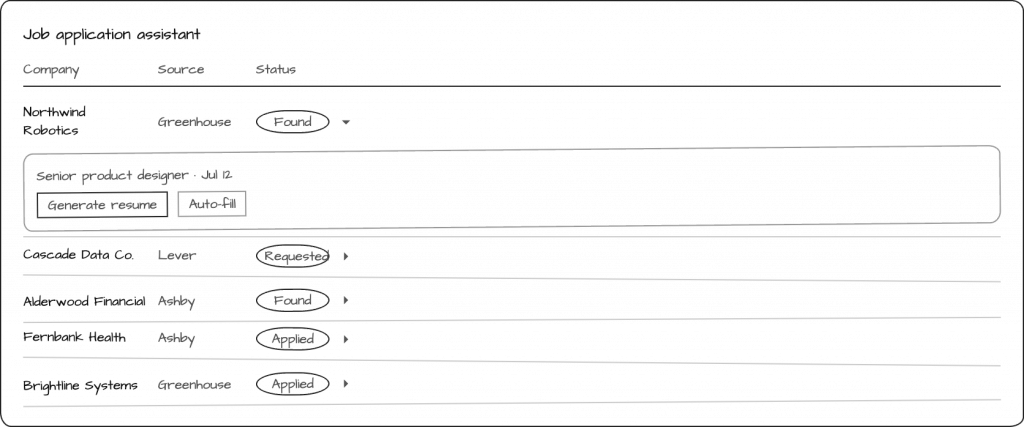
Usability Testing – Wireframe
Desktop Design
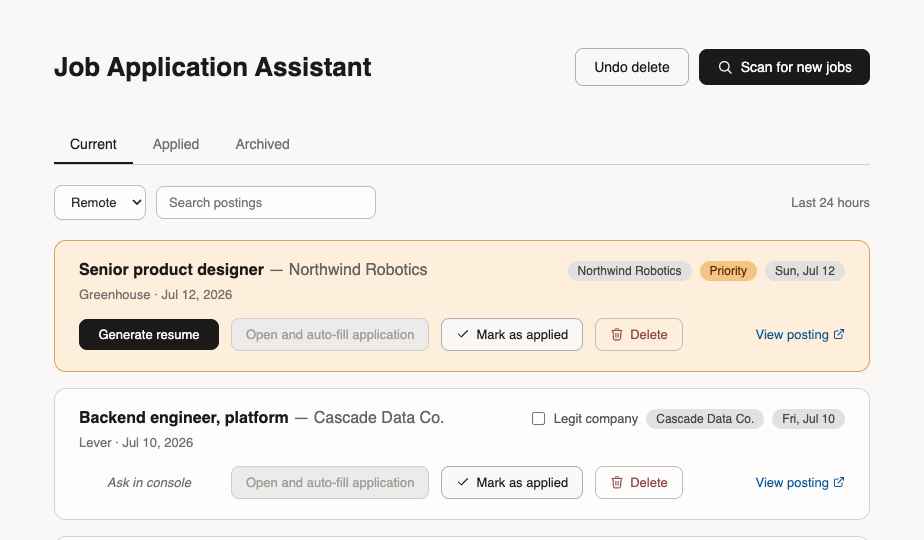
Claude CoWork was used to synthesize granular data findings from usability testing.
Wireframe Usability Test Results
1. Generate a tailored resume.
2. Apply for a job with AI-assisted tailored resume.
3. After applying, mark that job as “applied”.
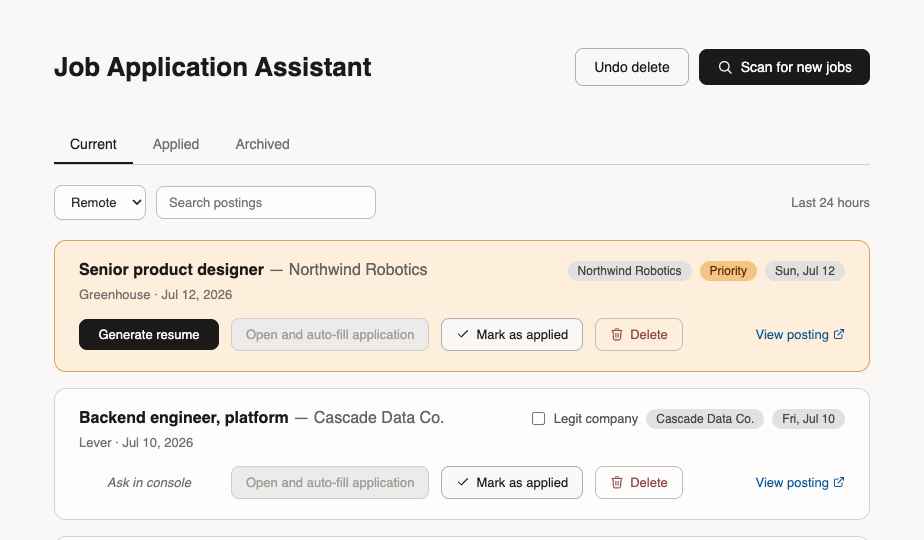
- ✅ All of our users were able to apply for a job and marked it as applied (5/5 user)
- ❌ The users voiced the steps were oversimplified for the usability test
(due to technical limitations, this was simplified. You could have to go into the Claude AI to get the files and apply manually for true use)
Pros
- Applications + tailored resumes, tracked in one place
- Instant jump-back when a company follows up
Cons
- No Claude console, local setup, or manual steps exposed to the user
- No roadmap features (job filters, search, radius) or built-in search
High Fidelity Testing Part I
We used the same testing script as the lo-fidelity test. We added some functionality buttons and some UI improvements.
1. Generate a tailored resume.
2. Apply for a job with AI-assisted tailored resume.
3. After applying, mark that job as “applied”.
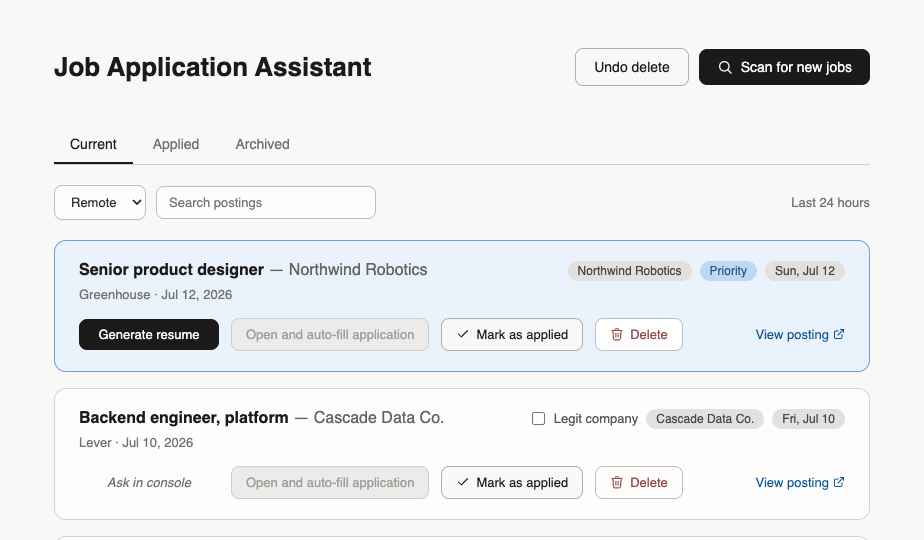
High Fidelity Part I Usability Test Results
- ✅ All of our users were able to apply for a job and marked it as applied (5/5 user)
- ❌ Users did want a more responsive UX process with UI elements to confirm their actions to be reflected
- ❌ Users did report vagueness in production function despite understanding product – too barebones
Claude CoWork was used to synthesize granular data findings from usability testing.
Post High Fidelity Part I User Test Changes
The users indicated a lack of UX features and UI polish that preexists in usual sites like LinkedIn for example. I introduced a number of these features users would expect from a current feature product.
Job Customization
Users can now customize the jobs they want ✅ with job title or companies for the scanner automatically searches for.

User Customization
Users can upload their resume ✅ for the AI as a baseline to customize for jobs they want to apply for.

Pre-Verified Jobs
Users can see jobs that are pre-verified ✅ per a established company name like Meta, Microsoft, etc.
Users are also able to see the job listing, job source (LinkedIn, etc), date, and other common details easily.

Active Search Filters and Job Options
Users can filter their job results ✅ just like a regular job search site with a second level of filtering.
Users on job cards can favorite, hide. flag, and delete ✅ jobs and let the system know how to handle certain companies or job titles in the future.

High Fidelity Testing Part II
1. Set up initial job scan settings.
2. Apply for a job with AI assistance.
3. Change job and user settings.

- ✅ All of our users were able to apply for a job and marked it as applied (5/5 user)
- ✅ users found apply UX more intuitive and UI easier to navigate
- ❌ Users did want more streamlined clearer UX options and felt overwhelmed by features
Claude CoWork was used to synthesize granular data findings from usability testing.
Final Design
Site Improvements
AI Opt out
Users can opt out ✅ of the AI apply features and simply use it as a job scanner.

Profile Setup
Users can set up a profile ✅ with their categories, titles, and most other features on any job search site.

Additional Filters
Users can set additional filters ✅ to parse down the list of jobs the scanner retrieves for finer metrics.

Application Tracking
Users can track job status ✅ to see where they are on the job interview track.

With these improvements, the final design is below with all the UX UI changes.
I used Figma AI and Claude design & dev tools at every step to research, design, and develop this product.
This is a fully functional prototype product (Github) with local credentials and assets.
Claude Design, CoWork, & Code was used to design and develop the product.
Product Video
Live recording of a fully working prototype product.
Press play(mobile) to see how the product works.
Welcome Screen

Main Dashboard

Job Settings

Learnings
 AI production completed in 20 hours.
I was impressed with the way Claude/Figma AI Design assisted me to bringing my vision to life in under 20 hours and the full functionality of the page. This tool solves many pain points of modern job hunters looking at thousands of jobs and gives them the dashboard in lieu of Teal or a manual spreadsheet. I hope I contributed as a free community tool for others to use to ease their job searching pain points as an open source option.